
Understand your points
The hover popup on the public points page is the audit trail for one number. You hover the ⓘ next to your name on an item, the popup opens, and you see every event that walked your balance from zero to today’s value.
If you ever want to know “why is my Sulfuras balance 15 and not 20”, this is where you check.
Open the popup
On the points page, find the item card and your row inside it. Hover the ⓘ icon next to your name, or click it to pin the popup open (so you can scroll without it closing).
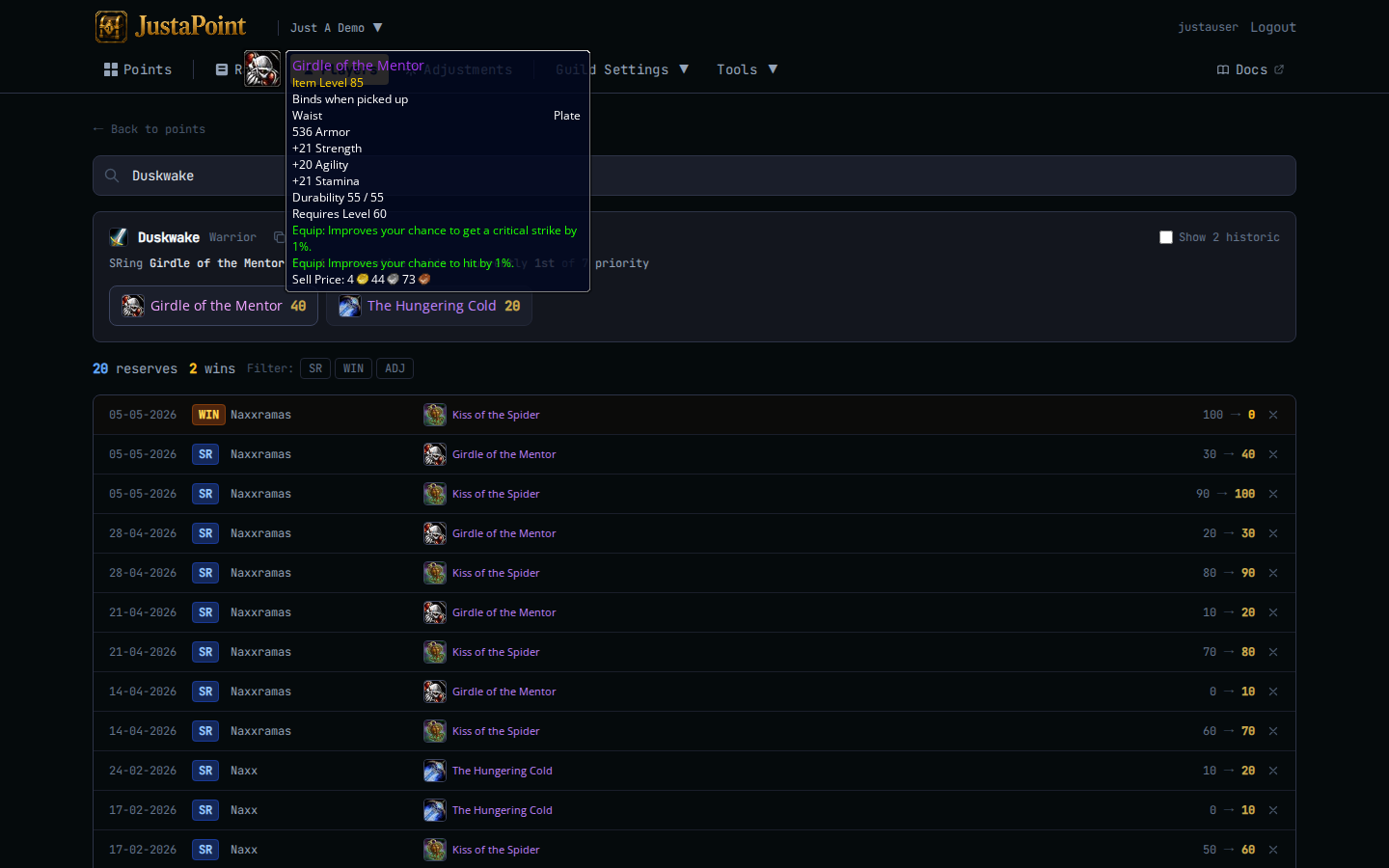
The popup lists every event affecting your balance on this item, in date order. Each row shows:
- The date.
- The event type — SR, WIN, ADJ.
- The before → after balance.
- For SR and WIN, the raid name.
- For ADJ, the reason your officer wrote.
The last row’s “after” value is your current balance. The math is transparent — you can add the deltas yourself and they’ll match.
Event types in the popup
SR — soft-reserve. You reserved this item on that raid. Your balance went up by the guild’s step (typically 5), or stayed at the cap if you were already at it.
WIN — you won this item. Your balance reset to 0. After this row, any future SRs start ticking up from zero again.
ADJ — adjustment. An officer manually nudged your balance with a reason. Could be a no-show penalty, a buff penalty from a raid where you missed Songflower, a goodwill bump after a long unlucky streak, or a fix to an earlier mistake.
The reason is the part to read. If you don’t understand an ADJ, the reason is what to ask your officer about — quote it back to them.
Worked example
You hover Arthas’s row on Sulfuras. The popup reads:
| Date | Event | Balance | Note |
|---|---|---|---|
| 2026-02-15 | SR | 0 → 5 | MC Week 1 |
| 2026-02-22 | SR | 5 → 10 | MC Week 2 |
| 2026-03-01 | SR | 10 → 15 | MC Week 3 |
| 2026-03-08 | ADJ | 15 → 10 | Missed Songflower at Ragnaros |
| 2026-03-15 | SR | 10 → 15 | MC Week 5 |
Current balance: 15. You can verify — three SRs (×5 = 15) minus the buff penalty (-5) plus one more SR (+5) = 15.
If the popup says 15 and the page header says 15, you’re aligned. If they disagree, that’s a bug — screenshot and tell your officer.
What’s NOT in the popup
The popup is per-item. It only shows events that affected your balance on this one item. If you’ve reserved Sulfuras AND Maladath, you see two separate popups for two separate histories.
For everything across every item, click your name on the row — that opens your full history page (/g/<slug>/player/<your-name> — demo), which lists everything you’ve ever done.
Why your raid order doesn’t match the points number
The in-game addon ranks rolls by roll + banked_points (and possibly minus a buff penalty if your guild has buff rules). So a raider with 5 banked points who rolls 90 beats a raider with 10 banked points who rolls 80. Points are an advantage, not a guarantee.
If you rolled high and lost to someone with more banked points who rolled higher still, the system worked — they were ahead AND they got lucky. Vice versa, if you lost to someone with fewer banked points, they rolled enough higher to make up the gap.
If you think the addon got the math wrong, the addon’s raid-chat post shows the calculation per roller. Screenshot it and ask your officer.