
Find your standings
The public points page is the link your officer pinned in Discord. No login, no install — open it in any browser. Everyone in your raid group sees the same page; what you do here doesn’t show up to officers.
Find your row
Top of the page: the search bar. Type your character name. The list filters to every tracked item you’ve ever reserved on, with your banked points on each.
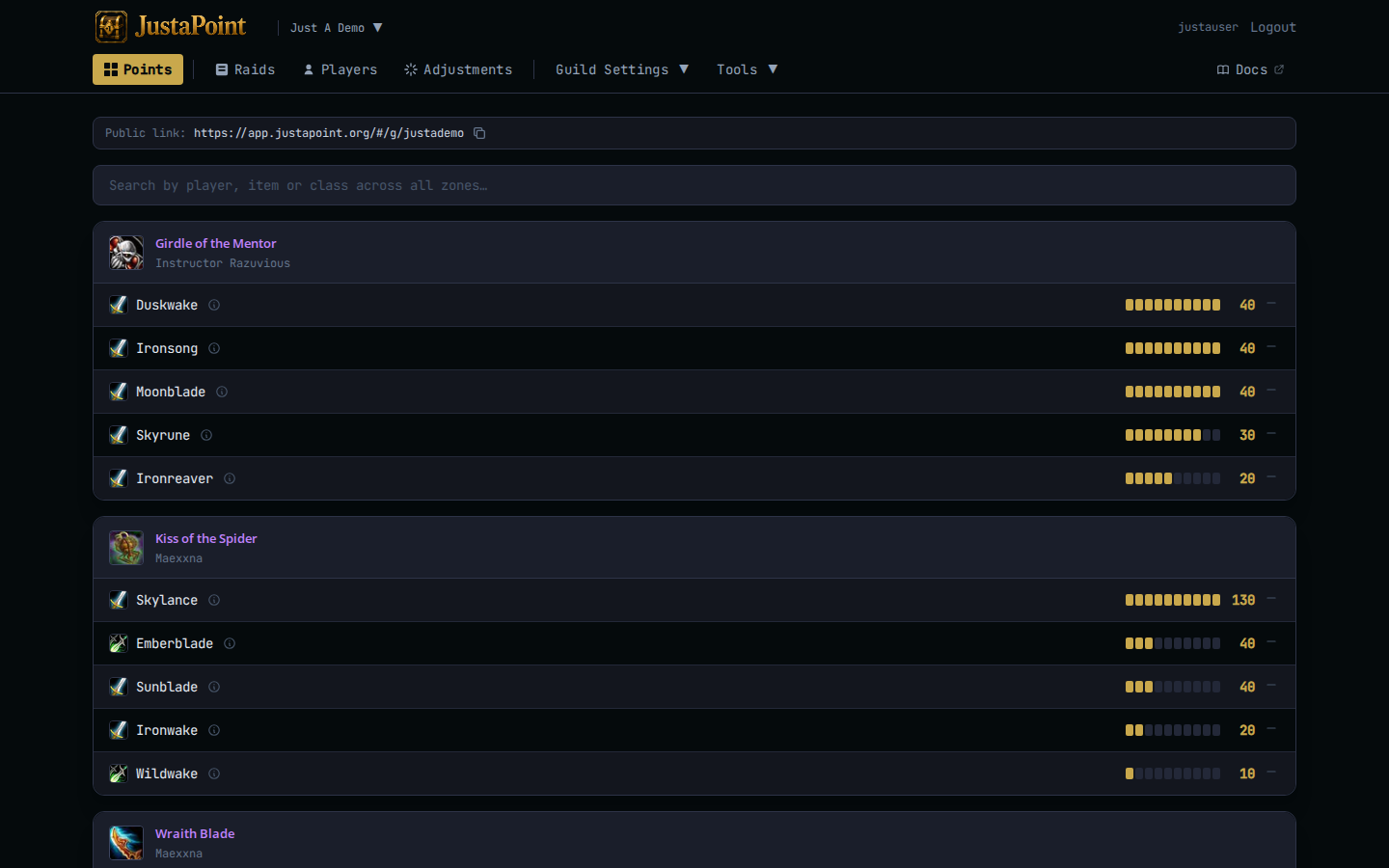
A row reads like this:
Sulfuras, Hand of Ragnaros — Warrior — Arthas — 15 — bar showing 5/10 pips filled
The number on the right is your banked points on that item. The 10-pip bar is a visual of where you sit relative to the cap. Five pips means you’re halfway to the cap; ten pips means you’ve maxed out and reserves won’t add any more (you’ll still SR it, you just stop accumulating).
Find a specific item
Same search bar — type the item name instead. The page filters to that item’s card and shows every reserver, ranked by banked points. Useful when you want to know “who’s ahead of me on Maladath” before tonight’s reserves.
The top reserver is who the addon will favor on the next /roll, all else equal. Second reserver is next, and so on.
Find a class
Type Warrior or Mage. Filters to that class’s rows across every item. Useful when you want to know how warriors are stacked up on the items you compete with them on.
See your full history
Click your name anywhere — every row’s player link goes to your full history page at /g/<slug>/player/<your-name> (example). Every reserve, every win, every adjustment you’ve ever had, sorted newest first.
This is what to send your officer if you want to dispute a number (“here’s my screenshot, you see I reserved week 1, 2, 3, 4, but only got step on weeks 1-3”).
If your character’s name appears slightly wrong — capitalization, an alternate spelling — there’s no rename tool. Talk to your officer; they can layer an adjustment to migrate your points to the right spelling.
What “tracked” means
The points page only shows tracked items. If you reserved something tonight that doesn’t appear here, your officer hasn’t tracked it (deliberately, usually — see Tracked items for the officer-facing logic).
Your reserve still recorded — it’ll show on the raid’s detail page if you have access — but it doesn’t contribute to your points anywhere.
The history popup
For the deep dive, Understand your points explains the popup that opens when you hover a row’s ⓘ icon. That’s where you audit a specific number.