
Install the addon
The addon is the in-game half of JustaPoint — it reads the export blob from the website, holds tonight’s reserves and point balances in memory, and ranks rolls live as the loot caller calls them. It also writes the end-of-raid export back out.
You install it once per WoW account. Every officer in your group who calls loot should have it; raiders don’t need it (the rankings post to raid chat).
Via CurseForge (recommended)
The addon is on CurseForge. Install it through the CurseForge app — it picks up updates automatically when we ship a new version.
Or hit Install the addon in the setup wizard on the website. That button opens the CurseForge page in a new tab.
Manual install
If you don’t run the CurseForge client:
- Download the latest
JustAPoint-vX.Y.Z.zipfrom the GitHub releases page. - Unzip into your WoW
_classic_era_/Interface/AddOns/folder. The result should be_classic_era_/Interface/AddOns/JustAPoint/JustAPoint.toc(no double-folder). - Restart WoW. The addon shows in your AddOns list at the character-select screen.
The website also serves a one-line PowerShell installer at /addon/install.ps1 for Windows users — iwr -useb app.justapoint.org/addon/install.ps1 | iex from PowerShell pulls the latest. (In prod the route returns empty — CurseForge handles distribution there.)
First-time use in-game
Log in. Type /jp — the import window opens.
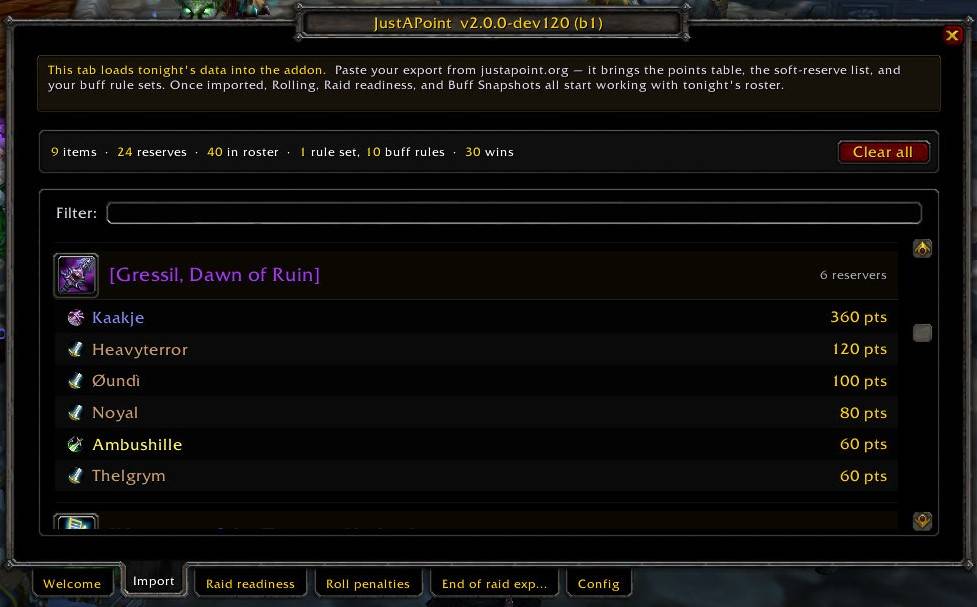
Paste the blob you copied from the website’s Step 2 (Export for raid → JustAPoint Addon). Click Import. Addon chat confirms with player and reserve counts.
You’re done. The addon now has tonight’s roster, every reserver’s banked points on every tracked item, and your guild’s active buff rule set. It listens to raid chat /roll messages and posts the ranked order automatically.
Slash commands
/jp— open the main panel. Roster, reserves, point balances./jp import— open the import window without opening the panel./jp export— open the end-of-raid export window (after the kill)./jp options— open settings (verbosity, debug, addon channel choice).
The addon doesn’t have a minimap button on purpose — /jp is two keystrokes.
What the addon does at raid time
Three quiet jobs:
- Raid readiness snapshot. Just before pull, the addon scans the raid for buff state. Buff rules are checked here.
- Per-roll ranking. When the loot caller calls a roll on a reserved item, the addon collects /roll lines from raid chat for ~10 seconds, ranks them by
roll + banked_points - buff_penalty, and posts the winner and the order. - End-of-raid export. When the night ends,
/jp exportproduces the blob you paste back into the website’s Step 3.
If something doesn’t work — the addon isn’t picking up your import, ranks look wrong, the export is empty — start by checking the addon version with /jp version and that you imported tonight’s blob (the import window shows the raid date it parsed).